


This article describes how to configure and deploy Gateway and API connectors in relation to GhostPractice.
Background
GhostPractice has a web front-end available for use by fee earners who are off-site and would like to access their fee histories, fees, and/or documents attached to their matters, together with other case management functionality.
GhostPractice hosts the web front-end on Microsoft’s Azure infrastructure, which allows uninhibited access to the front-end from any device connected to the internet.
Minimum Requirements
To deploy a Web or API to an existing GhostPractice instance requires:
- A server with any Microsoft Windows 64-bit operating system (currently under Microsoft support), GhostPractice v12.0.92 (or later), SQL Server 2012 (or later – all editions supported)
- An account with SQL Administrator and Local Administrator rights
Connector Services
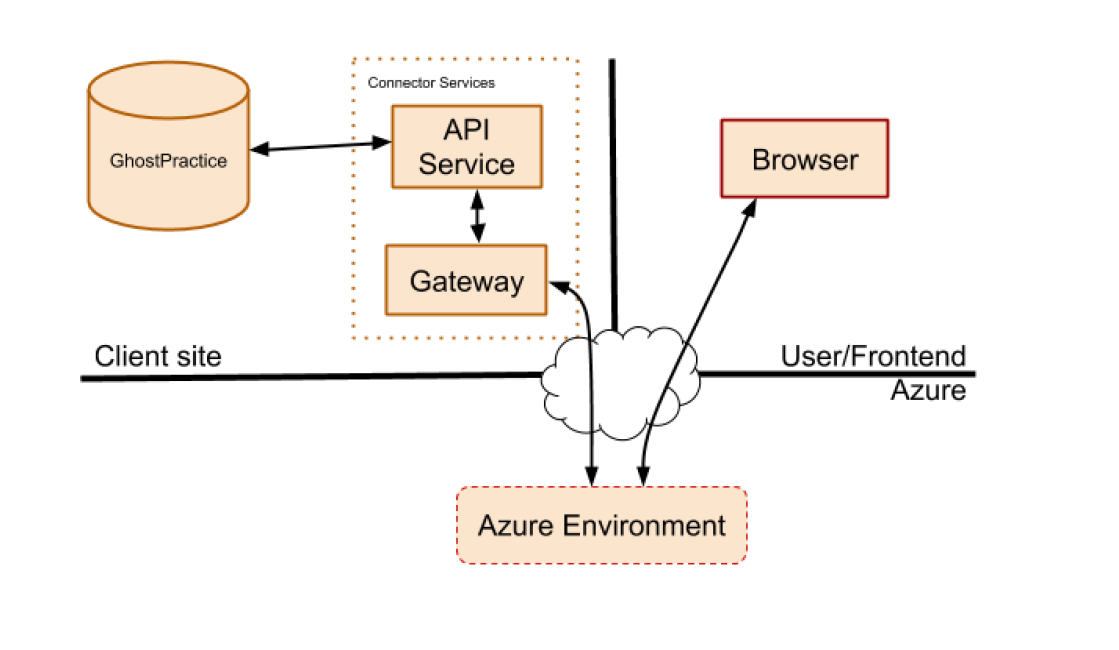
Since all data is stored on-premises, GhostPractice requires a way to access this data from the web as and when required. This necessitates the installation of a set of connector services called the
- GhostPractice Gateway
- GhostPractice API
These are installed at each client who requires either the web front-end capability or interconnectivity with other web-based software packages that GhostPractice may integrate with.
These services provide a secure path whereby our Azure infrastructure can access the relevant GhostPractice data safely, and with a minimum of configuration and management required.
The Gateway service opens a persistent idle outgoing connection to our Azure infrastructure, over which the infrastructure can request data as and when needed. This channel is secured with a pair of unique keys, generated per deployment, ensuring that only authorised users have access to the relevant data.
Deployment
The connector services can be installed on the same machine as the current Scheduler, Search, and/or Application services. Installation will require an account with SQL Administrator and Local Administrator rights to allow for database structure updates to be run, as well as for local resources to be created on the machine (like error event logs).
GhostPractice will provide a key file containing the generated unique keys for the deployment, and this will need to be provided to the installer upon installation.
Once installed, the Gateway will initiate a persistent connection, and authorised users will be able to use the API and/or Web front-end.
Firewall
TCP ports 443, 5671 and 5672 must be open for outgoing traffic from the machine where the connector services are installed.
If required, this can be further limited to only allow traffic to the following location: titan-prod-za.servicebus.windows.net
Security
- No data is stored in the cloud
- All infrastructure is entirely hosted in South Africa, ensuring that client data in transit will not leave South Africa.
- Sessions to the web front-end are HTTPS encrypted for security
- Users log in with a unique username / password & optional One-Time-Pin (OTP) delivered via either Email or Text Message
- Strong password policy enforced.
Bandwidth
Because of the amount of data that could potentially be transferred, a fibre connection with high-bandwidth upload-channel is highly recommended. (We do not recommend deployment to sites with ADSL connections).